
Technical decoder and CV reference
- Open Edit > CV > Files & import. Import your exported CV TXT; a decoder project file is stored separately.
- Under Explained clearly, review address, driving behaviour and brakes. All CV values contains the complete raw data and index pages.
- Open Control, review suggested additions and symbols, then save together with Save changes. Manual entries remain protected.
You do not need to understand every raw value. Explanations require matching model, firmware and addressing. Look up a decoder.
Try twelve example CVs, index pages and provenance.
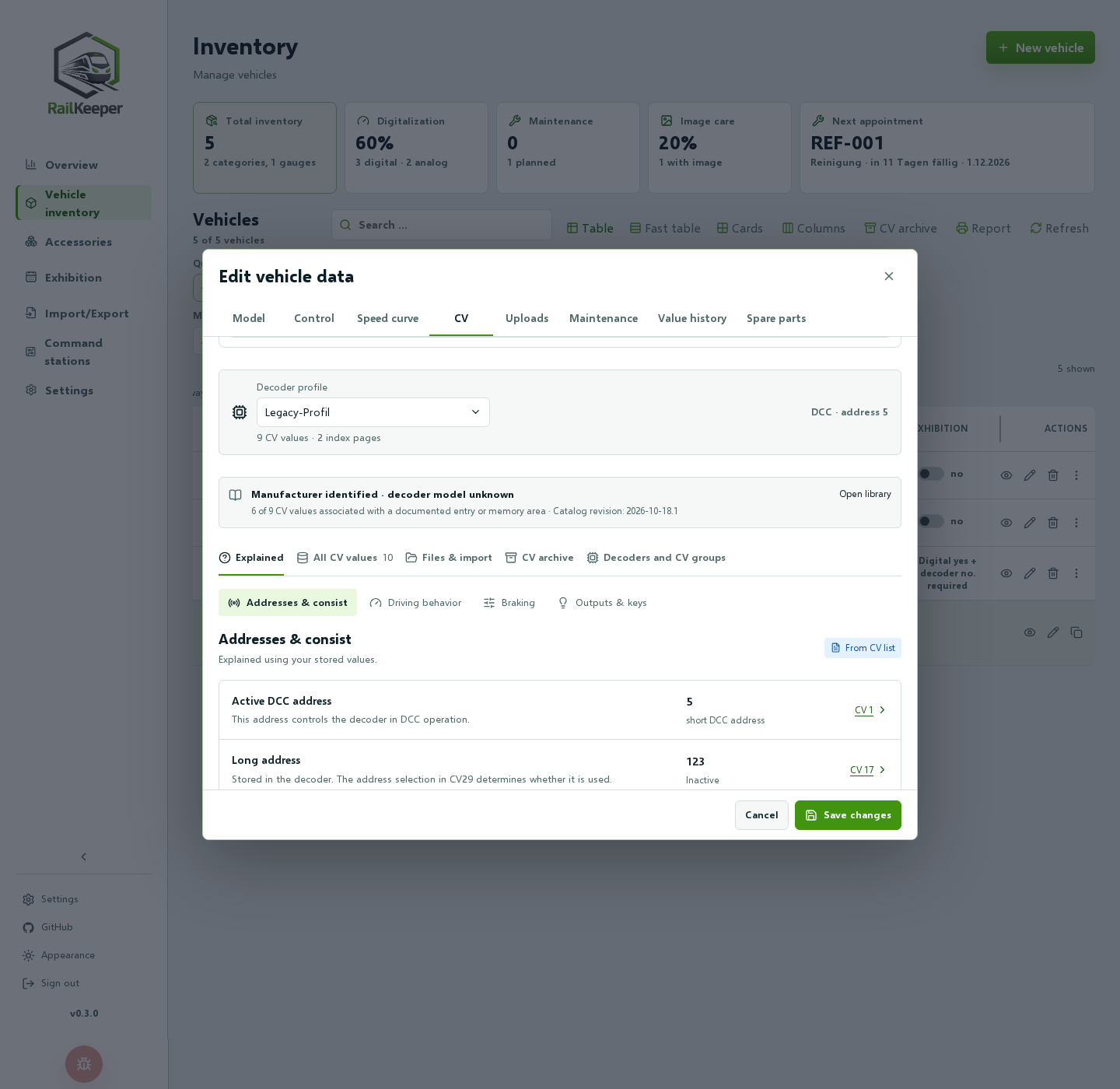
RailKeeper keeps function mappings, speed-curve data, CV values, and decoder project files with a vehicle. The connected workflow is available in Control, Speed curve, and CV.
Decoder library
Settings > Data > General > Decoder library navigates manufacturer, family and model. The initial directory covers ESU, ZIMO, Doehler & Haass, Lenz, Kühn, Uhlenbrock, Roco and PIKO. Reviewed model CV rules include LokPilot 5 micro DCC, MN180N18, DH18A, STANDARD+ V2, N45, 76420, 10882 and 56500, subject to their model, OEM and firmware boundaries. Other models have product data and sources. DCC foundations have their own entry. CV definitions shows CV numbers, index pages, value ranges and bit meanings; search for CV 29, 291 or ABC. Identification explains the evidence required; Sources lists manual revisions and scope. Admin and Editor can enable or disable interpretation; Viewer can read the library. Stored readings remain unchanged. See Library structure.
The import preview and Model > Digital, Control and CV use the same definitions.
CV details show the selected explanation's source and location. Documented units and the Documented factory value remain separate from the reading; they never fill or replace vehicle values. LokPilot 5 micro DCC CV57/58, CV141–143 and CV250 are labelled Reserved in the ESU manual and do not increase functional interpretation coverage. A set mapping bit assigns a function to that row; it does not report a live function state.
Identification requires the manufacturer ID in unindexed CV8 and either a matching profile name or a documented type identifier. CV8=97 with CV261=180 identifies DH18A; CV8=99 with CV7=77 or 79 identifies STANDARD+ V2. Lenz CV7 identifies the type rather than the full firmware version. ESU still requires a matching profile name.
For DH18A, output assignments, off-function masks, shuttle operation and output conditions are explained separately. Output timers do not establish momentary key mode; SUSI direction reversal does not establish function-key inversion. CV137 changes mapping-bit meanings. The speed-curve view displays characteristic parameter CV48, without inventing DCC curve points. Brake-ramp configuration uses CV154/155. All raw readings remain accessible in CV; missing values stay unknown.
CV8=145 with CV250=127 confirms the ZIMO base type MN180, without confirming the N18 interface. MN180N18-specific interpretation also requires the unambiguous profile name. Identified models without reviewed CV rules use DCC foundations only. Manufacturer identifiers alone never confirm a model; indexed values never provide type evidence. Missing or conflicting evidence stays visible; conflicts use only the active DCC foundation. Other protocols do not receive DCC interpretations.
Motor control, light brightness and braking registers follow the selected model. For example, CV51 is a braking register on Lenz, connection swapping on D&H and a motor parameter on ESU. Use CV settings copies identified vehicle fields into the form only after your click; Save changes persists them.
The documented firmware scope starts at 5.3.128 for ESU, 3.15 for DH18A and 5.29 for MN180N18. STANDARD+ V2 follows its linked manual. An identified older firmware suspends manufacturer-specific interpretation. Missing firmware is marked as uncertain; a newer version does not guarantee identical behavior.
The coverage count includes individual CV definitions and documented memory ranges. Associating an entry with “mapping conditions” does not fully explain every byte. Unknown CVs remain unknown. An AUX assignment does not identify the function physically connected in the vehicle; suggestions still require explicit application.
For LokPilot 5 micro DCC, explanations distinguish motor PWM, trim, back-EMF sampling, brake functions, analog parameters, output configuration on CV31=16/CV32=0, and the eight random functions on CV31=16/CV32=13. Mapping conditions and actions have separate column meanings. A CV range with step 16 covers every sixteenth address, leaving gaps unassigned. An output parameter may describe brightness or servo timing depending on its mode; a configured AUX number does not identify the attached vehicle function.
Newer registers state their individual firmware scope. Known older firmware receives no such interpretation: CV114/115/131 from 5.4.139, the documented SUSI option in CV122 from 5.6.142, and CV199 from 5.8.156. Sources are the ESU manual, eighth edition and LokProgrammer release notes. CV11 describes the DCC packet timeout from 5.14.183; the German release notes do not document a complete value scale. CV245 describes the waiting time between pushing and pulling away in the uncoupling cycle, documented for LokPilot 5 in the ESU 41002 manual, section 7.4, page 4. Both definitions show raw-byte bounds without an unsupported conversion to seconds. Unpublished index pages and conflicting table addresses remain unassigned, including CV272 on page 16/0, the first mapping-column G addresses and some Q addresses. Apparent printing errors are not silently treated as verified facts.
The library is stored locally, included in master-data JSON and application backups, and separate from vehicle readings. Values, decoder profiles, index pairs, source lines and export timestamps remain unchanged. Nothing is written to a command station or decoder.
Prerequisites and access rights
Open a vehicle in Vehicle inventory, choose Edit, then select the required tab. General fields such as Digital, decoder number, decoder type, and ABC braking are covered by Vehicle inventory and core records.
A vehicle must normally be saved once before RailKeeper can persist functions, CV values, or files. An unsaved ECoS draft can preview CVs and a derived curve, but its normal write actions remain disabled.
Admin, Editor, Viewer users can inspect stored decoder data. Viewer-level access can also export functions and CV values and download decoder files. Only Admin and Editor can save, import, apply, upload, or delete data. The server enforces this boundary.
Save other edits first
CV and decoder-file writes reload the complete selected vehicle. Save or intentionally discard pending core fields, function edits, image metadata, and changes on other tabs before a write action.
Map digital functions F0-F31
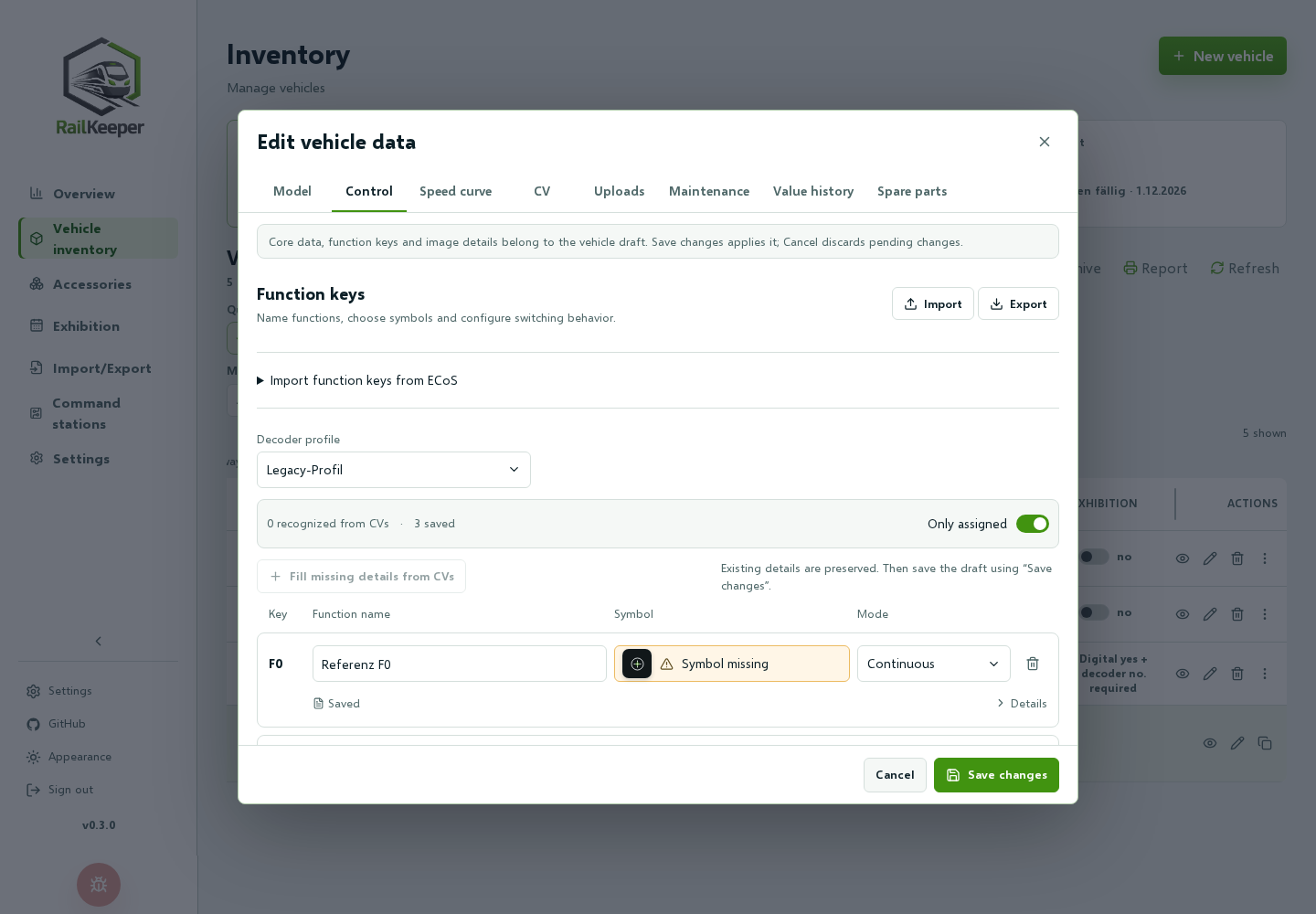
Open Control. Function keys is the shared editing list. Only assigned is on by default and includes saved, manually added and reliably CV-mapped keys. Counts distinguish recognized and saved functions. Turn the filter off to add another key from F0 through F31. The plus icon explicitly adds an untouched default to the draft.
Each row contains Function name, Symbol, Mode and Delete. Missing symbols have text and a subtle amber mark; clicking opens the symbol picker. Choosing a symbol preserves an existing custom name and fills only an empty name with the symbol label. The function type follows the symbol.
Details contains Direction-dependent, Inverted, Your note and the collapsible View provenance and CV values. Saved technical evidence remains fully readable there and is preserved when editing your own note. Opening the view does not rewrite historical notes. Current CV values appear separately for comparison.
Fill missing details from CVs combines matching symbols, documented names and, for the reviewed profile, mode/inversion in the editing draft. Known details and manually selected modes are protected. AUX numbers do not receive guessed vehicle function names. Function mapping from CVs is collapsed at the end as a technical reference.
The bundled choices use RailKeeper's independently authored Werkstatt-Linie. ECoS imports map numeric function-description codes to these stable RailKeeper keys; the code is interoperability metadata and does not identify the graphic source. Administrators can add custom symbol keys and images in master-data settings.
| Stored type | English meaning |
|---|---|
standard | Standard |
sound | Sound |
licht | Light |
kupplung | Coupler |
rauch | Smoke |
sonderfunktion | Special function |
Modes are stored as dauer and moment and displayed as Continuous and Momentary. The Direction-dependent and Inverted fields are independent and both start as Unknown. Only an explicitly selected or supported adopted answer is stored as Yes or No. Direction dependency is not inferred from these flags. Mode and inversion can be filled for the verified profile and firmware; see the function exercise.
The former checkbox had an ambiguous label. Existing values remain visible as a Legacy value; both independent fields initially become unknown. Names, symbols, mode and notes are preserved. Saving another property does not reinterpret the legacy value.
F0 offers Fahrlicht, the light symbol and type licht as defaults when adding a key. An untouched F0 default alone does not count as assigned. New rows start at dauer; Continuous (default) distinguishes this initial value from a chosen or adopted mode.
All edits, supplements and deletions stay in the draft. Save changes commits vehicle fields and changed functions together. A pending deletion can be undone; Cancel discards unsaved function changes. Vehicle creation from an ECoS draft also commits its supplied functions together. If another editor has changed a function in the meantime, this save commits nothing and preserves the draft for comparison.
The server accepts F0–F31, known types and modes, names up to 120 UTF-8 bytes, symbol keys up to 80 UTF-8 bytes and notes including provenance up to 1,000 UTF-8 bytes.
Import and export functions
Export downloads <inventory-number>-funktionen.json. Without an inventory number, the name is railkeeper-funktionen.json. It contains vehicle inventory number, name, decoder number, and all assigned mappings. The decoder number prefers the primary digital number and falls back to the DT decoder number. Export uses the current rows, including unsaved local function edits, but does not save them in RailKeeper.
Import reads the first JSON file, either a top-level array or a functions or functionMappings array, into the editing draft. Invalid entries or duplicate keys block the entire import and leave the existing draft intact. Review the rows and choose Save changes. Until then Cancel also discards the import.
New function JSON exports identify the independent meanings with flagsVersion: 2. directionDependent and inverted independently contain true, false or null (unknown). Any legacyDirectionDependent remains an ambiguous reference. Older files without the version marker confirm neither field and cannot replace previously confirmed values. App backups from version 24 preserve all three states; older backups restore the former value as legacy data.
Read the speed curve
Open Speed curve. This tab is Read only. It calculates a speed characteristic from stored CV values or an ECoS draft and never writes to RailKeeper, a decoder, or a command station.
RailKeeper groups relevant CVs by decoder profile and protocol. Select a profile to view:
- the number of relevant CVs in that group;
- curve mode;
- CV 29 state;
- plotted point count;
- forward/reverse trim;
- the chart and the underlying CV lists;
- missing CVs.
The 3-point curve uses CV 2 at speed step 1, CV 6 at step 14, and CV 5 at step 28. The 28-point speed table uses CV 67 through CV 94. CV 66 supplies forward trim and CV 95 reverse trim.
When CV 29 is known, bit 4 selects the 28-point table or 3-point curve. If the selected curve has no points, or CV 29 is unknown, RailKeeper falls back to the most useful available data: a complete 28-point table, at least two 3-point values, any table values, then any 3-point value. This fallback changes only the display.
Manage CV values manually
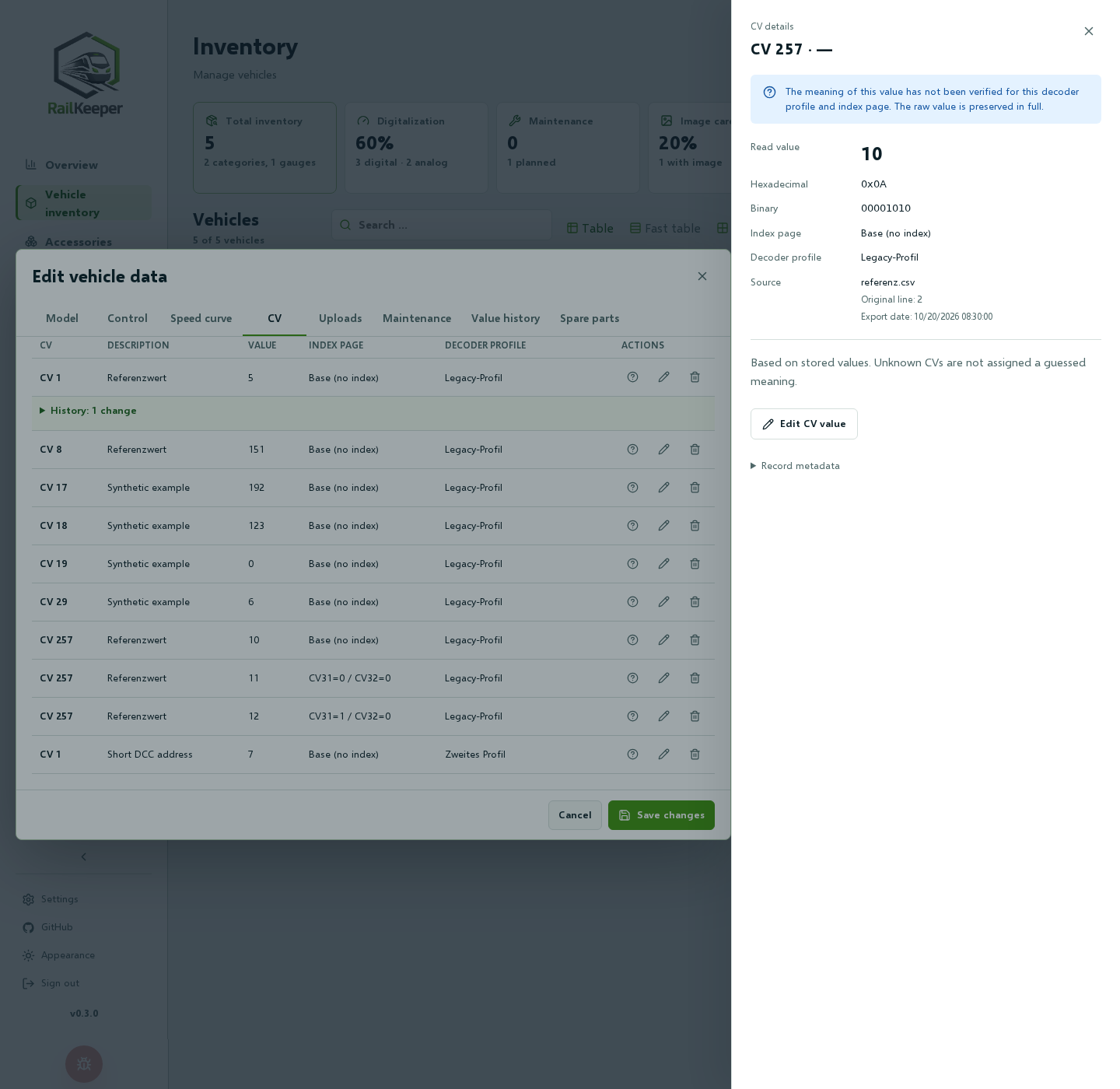
Open CV. The summary shows the number of CV values, Profiles, and Files.
The manual form contains:
| Field | Rule |
|---|---|
| CV number | Required integer from 1 through 1024 |
| Value | Required integer from 0 through 255 |
| Category | Optional stored German category, up to 80 UTF-8 bytes |
| Protocol | Optional protocol, up to 80 UTF-8 bytes |
| Decoder profile | Optional free text, up to 160 UTF-8 bytes |
| Source file | Optional decoder file belonging to this vehicle |
| Description | Optional text, up to 1,000 UTF-8 bytes |
Stable categories are Adresse, Fahrverhalten, Motor, Licht, Sound, Funktion, Decoder, and Sonstiges. They remain German in the English interface.
Protocol choices are Motorola 14, Motorola 27, Motorola 28, Motorola FX 14, DCC 14, DCC 28, DCC 128, LGB, and Selectrix.
Common profile suggestions are ESU LokPilot 5, ESU LokSound 5, Zimo MS, Zimo MX, D&H SD, D&H DH, Märklin mLD3, Märklin mSD3, and Lenz Standard+. Profiles already used by CV values or files appear as shortcuts. A profile is descriptive free text, not validation of the physical decoder.
A CV identity consists of vehicle, exact trimmed decoder profile (case-sensitive), CV number and an optional CV31/CV32 pair. Protocol is descriptive. Unindexed values differ from page 0/0. Indexed CVs 257–512 require both index fields in the range 0–255. Existing unindexed records remain unchanged. Give multiple physical decoders on one vehicle distinct profile labels, even if their decoder types are identical.
Choose Stage in CV draft to prepare a new or edited value. A matching record is identified by profile, number and index pair. Blank optional fields in the add form do not erase its existing metadata; use Edit CV to clear a field deliberately. Mark CV for removal prepares a deletion.
The CV draft compares stored and pending data. Only Save CV draft commits up to 500 changes together, including history. An error or conflict applies no subset. Discard CV draft, discarding one change and Cancel leave stored CVs unchanged. The bottom Save changes action still saves the vehicle/function draft; manual CV changes have their own save boundary.
Concurrent changes retain your input. Review current values and, where appropriate, choose Use this CV as the new draft baseline. Your changes remain; newer fields which you did not edit are adopted. Another occupied profile/index identity is never replaced. Edit the pending target or discard that change.
Only a committed numeric value change creates history. The table shows the five newest changes per value. Explanations, function suggestions and speed curves use stored CVs until the manual draft commits.
The table displays index pages and supports profile, page and text filters with 50 rows per page. For one selected profile, Key decoder values derives DCC address, manufacturer ID, CV29 bits, analogue and RailCom flags from stored base CVs. These are recorded settings, not live status; vehicle address and function names remain unchanged. Select a profile first when several exist.
RailComPlus registration name and function symbols
For the reviewed ESU LokPilot 5 micro DCC, Model → Digital displays the RailComPlus registration name from page 1/0. This mutable decoder name is not type evidence and does not replace the vehicle name. The evaluator supports the reviewed ASCII range CV261–288 with a zero terminator; missing or duplicate bytes and unverified encodings receive a notice.
Control shows symbol suggestions from page 1/1, including key, symbol code, index page, raw values and any recorded source line/export date. The verified list yields F0 headlights, F1/F2/F5/F6 general function, F3 shunting and F4 acceleration/braking delay off. The 25 unassigned key descriptions F7–F31 do not create functions. The adjacent mapping analysis describes actual output and logic assignments; a symbol alone cannot confirm attached hardware.
The combined Fill missing details from CVs action fills a missing symbol only when exactly one active master-data symbol matches. Existing names, symbols and known switching settings remain protected. Save changes then commits the complete draft. Read-only users can inspect the details.
The byte layout follows an empirical JMRI comparison definition. Labels follow the ESU symbol table. For LokPilot 5 micro DCC with firmware 5.14.183, the combined Fill missing details from CVs action also fills these fields in the editing draft. Four exports each for F0 (Light), F1 (Physical) and F3 (Logical) from LokProgrammer 5.2.18 confirm momentary mode in bit 7 and inversion in bit 4 of the first descriptor byte on page 1/1. For F0, CV257 takes values 0, 128, 144 and 16; CV258 stays 3. For F3, CV263 takes values 96, 224, 240 and 112; CV264 stays 9. Category and symbol remain independent of both settings. The notice and new provenance notes name all three comparisons. Existing saved notes are preserved. Other keys follow the same JMRI descriptor format; positive comparison exports were not tested for each key.
Saved modes and modes selected in the form are preserved. An unselected default on a new function may be filled. Inversion is filled only when Unknown; both Yes and No are protected. Names, symbols and direction dependency are preserved. Notes document only the adopted fields, both CV addresses and raw values, available original lines and export date, and the verified decoder/software version. Then use Save changes. Saved CVs do not need to be imported again.
For other or unknown firmware versions these flags remain comparison-only and cannot be applied. Incomplete byte pairs, contradictory known export dates and unsupported decoder profiles are left uninterpreted.
Both import previews use the same evaluator under Review RailComPlus data from import file. It covers valid file rows independently of the CV save selection. After importing the CVs, symbol suggestions are available under Control. Saved CVs are evaluated when opened; another import is unnecessary.
Files for a complete import
Locomotives and cars with function decoders use the same workflow on the selected saved vehicle.
| File | Required | Processing and display |
|---|---|---|
| Complete LokProgrammer TXT CV list | For complete ESU CV import | All values and index pages in the preview and CV table |
| CSV or RailKeeper CV JSON | Alternative to TXT | Structured values, profiles and optional index fields |
| ESUX / ESU | Optional | Original project under CV files with safe metadata preview; proprietary CV payload is not decoded |
| Copied decoder information text | Optional | Vehicle attachment documenting serial, firmware and raw identifiers; no automatic identity import |
| Screenshot, photo, manual | Optional | Vehicle attachments/images as evidence; no automatic OCR or CV recognition |
| Function JSON | Optional | Names, symbols and modes through the separate function import |
TXT import does not require ESUX. Generic project names and a type such as steam cannot identify the actual locomotive. Raw CV mapping cannot confirm which lamps or couplers are wired to AUX outputs.
Import and export CV values
Import reads the first selected file: TXT/CSV up to 2 MiB, CV JSON up to 32 MiB, with at most 10,000 values. The larger local JSON limit accounts for exported record identities, timestamps and history. Only importable fields are sent to the server; the atomic import request remains limited to 8 MiB.
- LokProgrammer TXT supports
Decoder:,CV 001 = 003andIndex: 4099 (CV31=16, CV32=3). The decoder header provides the profile without its firmware suffix. Malformed or inconsistent index headers block the entire preview. In this ESU format, CV numbers above 256 require an index page. Use structured CSV or JSON for higher unindexed CVs from other manufacturers, such as D&H CV261. - JSON may be an array or an object with
cvValues. Optional fields areindexCV31andindexCV32. Older unindexed JSON remains supported. - CSV supports named columns, e.g.
cvNumber;value;decoderProfile;indexCV31;indexCV32, including aliasescv_number,cv31,cv32,CVandWert. Without headers, order is CV number, value, description, category, decoder profile, CV31, CV32. Commas and semicolons are accepted. - Lists retain their own decoder profiles and provenance. Profile and attachment selections in the single-value editor apply only to that edited value and are not inherited by list imports. Attachment IDs from exported JSON are not automatically transferred.
Preview statuses are new, changed, same and invalid. New and changed rows start selected. Only repeated complete identities are duplicates; CV257 on page 16/3 and CV257 on page 16/4 remain separate values.
Only new, Select all, Select none and individual checkboxes apply across all preview pages. Apply selected fields commits the selected values and histories in one transaction. Any failure rolls back the whole import. The original file can be stored separately under CV files.
Export downloads <inventory-number>-cv.json or railkeeper-cv.json. It contains the vehicle identity, preferred decoder number, and all CV records returned with the vehicle, including metadata and history. It excludes the current unsaved CV form, function mappings, and decoder-file contents.
Some stable preview status and validation messages remain German in the English interface. The visible CV toolbar labels Import and Export remain English in both language modes.
Preview, apply, and store decoder files
Under Files & import, enter an optional decoder profile and note, then choose Upload decoder project. Multiple files are allowed.
Supported extensions are:
- JSON, CSV, TXT, and XML
- Z21
- ESU and ESUX
- LokProgrammer
- ZIP
The normal limit is 25 MiB per file. An operator can configure another attachment limit. RailKeeper rejects unsupported extensions, blocked executable or script content, empty files, and files above the server limit.
Selection first creates an Upload preview. It can show size, MIME type, a preview image, project, decoder, address, type, manufacturer, LokProgrammer metadata, and counts of detected CV values and function keys. A preview does not store the original file.
LokProgrammer TXT supports up to 10,000 CV values with index pages. For JSON/CSV/TXT, Review CVs rereads the original file through the complete CV import path. Other preview formats provide extraction suggestions and may be incomplete. Function suggestions remain limited to 32. Binary ESUX supplies metadata, not a complete CV import.
The preview actions are independent:
- Apply suggestion copies the first recognized profile and description into the unsaved file fields.
- Review CVs sends detected values to the normal CV import preview. Nothing is written until selected CV rows are applied. A detected profile wins; otherwise RailKeeper uses the current file profile, detected decoder, or detected project name in that order.
- Add to function draft supplements missing fields in the shared function draft and opens Control. Existing names, symbols, modes, flags and intentional edits stay protected. Conflicting file suggestions are not selected. Source filenames remain visible. Only Save changes commits these function keys.
- Save files stores the selected original files with the current profile and note.
Applying CVs or functions does not save the original file. Saving files does not automatically apply detected CVs or functions. Recognized ESU/LokProgrammer metadata can fill fields that were left empty during file saving.
If one file in preview generation fails, no file has been stored and the batch does not produce the normal preview. Save files stores multiple files sequentially. A later failure does not undo earlier successful uploads. Each operation is limited to 20 files. Per-file results distinguish saved, rejected, unattempted, skipped and unknown responses. Resume sends only rejected or unattempted files. Check unknown responses in the refreshed file list first. Function suggestions remain pending until the shared save.
Stored files show original name, profile, MIME type, size, and description. Download retrieves the original file. Delete opens confirmation showing the vehicle, file name and current linked CV-value count. Only confirmation removes stored file data, provided no other file reference remains. Changed usage blocks deletion.
A CV value can name a decoder file under Source file. Deleting the original retains CV values, IDs, histories and historical source identifiers. The removed original can no longer be opened. An existing CV may retain its own historical reference during editing; a new assignment to a missing file or another vehicle's file is rejected.
Use an ECoS preview as an input path
An unsaved ECoS locomotive draft can supply CV values and function mappings before the vehicle exists. The CV tab shows the complete value list with pagination and the source locomotive. Speed curve can derive its read-only display from the same draft. Control loads the draft's function mappings into the editable function rows.
With an ECoS draft active, saving the core vehicle is a special multi-step workflow. RailKeeper saves vehicle fields and changed functions together first, then writes the ECoS external mapping and draft CV values in sequence. Only full success marks the ECoS import as saved and reloads the vehicle. A later failure does not roll back the vehicle or earlier ECoS writes. Reload, compare the stored mapping, CVs, and functions with the draft, then repeat only the missing work.
After successful completion, normal function, CV, and file actions use the stored vehicle. This chapter does not cover ECoS connection setup, raw probes, synchronization, conflict handling, or writes to a command station. See ECoS sync and command-station setup for those workflows.
ECoS values retain their own provenance. A clear CV8 manufacturer and matching saved decoder type can enable model rules. Missing index pages remain unknown; a library match does not invent them.
Protect data during writes
| Action | Persists data | Reloads the complete vehicle |
|---|---|---|
| Edit, supplement, import or delete functions | No, draft only | No |
| Save changes | Vehicle and changed functions together | After success |
| Import function JSON | Only with Save changes | No |
| Export function JSON | No | No |
| View the speed curve | No | No |
| Save with an active ECoS draft | Vehicle/functions together, then mapping/CVs | After full success |
| Build or select a CV import preview | No | No |
| Apply selected CV rows | Entire selection atomically | After success |
| Stage a CV or mark it for removal | No, draft only | No |
| Save CV draft | Entire selection atomically | After success |
| Export CV JSON | No | No |
| Build a decoder-file preview | No | No |
| Apply a metadata suggestion | No | No |
| Review detected CVs | No, until rows are applied | No |
| Add to function draft | Only with Save changes | No |
| Save decoder files | Sequentially | Only after full success |
| Download a decoder file | No | No |
| Delete a decoder file | After explicit confirmation | After success |
Functions, CV values, CV history, decoder-file metadata, and decoder-file data belong to the local RailKeeper application backup. Create and validate a current backup before large imports or cleanup. Function and CV JSON exports are exchange files, not complete RailKeeper backups.
Troubleshoot decoder data
| Situation | Response |
|---|---|
| Vehicle is not saved | Save the core record before persistent function, CV, or file actions. |
| No function appears under Only assigned | Disable the filter, enter a name, symbol, or note, and save. |
| Function import finds no valid mappings | Check the JSON shape, F0-F31 keys, stored type names, and modes. |
| Speed curve is empty | Add or import CV 2/5/6 or CV 67-94 in one profile/protocol group. |
| Curve selection looks wrong | Check CV 29, profile/protocol grouping, and missing CVs. |
| CV input is rejected | Use an integer CV from 1-1024 and a value from 0-255. |
| CV import reports a duplicate | Keep one CV-number/profile identity in the source. |
| File preview has no metadata | The file may still be stored, but no suggestion is available. |
| File is rejected | Check extension, content, empty-file status, and the operator's size limit. |
| A file is still a CV source | Review its linked-value count before confirming. Historical CV references remain after deletion. |
| CV draft reports a conflict | Review stored and pending data. The draft is retained; resolve deliberately before saving again. |
| Several file uploads partly fail | Reload, compare stored results, then retry only missing files. |
| A separate action refreshes the vehicle | Pending vehicle, function and CV drafts are retained. Diverging data requires review. |
| A pending CV deletion was a mistake | Discard that change before saving. Recovering an already saved deletion requires a suitable backup. |
No failed later request rolls back an earlier successful request in the same sequential action.