Look up a decoder
The decoder library explains what RailKeeper knows about a particular decoder model. It is a reference and does not change vehicle readings.
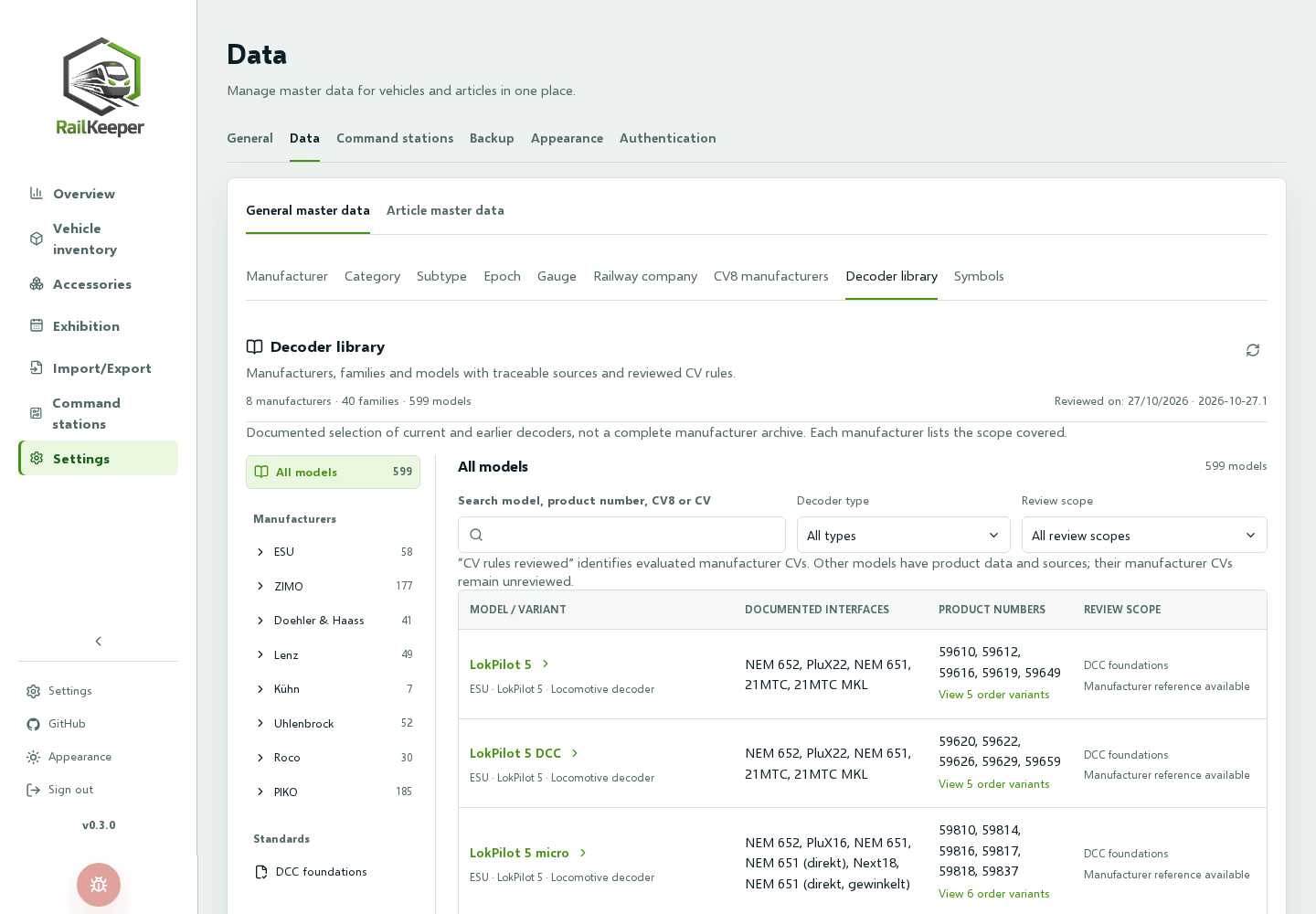
Find a model
- Open Settings > Data > General master data > Decoder library.
- Choose a manufacturer on the left, or search by model, article number, manufacturer ID, or CV.
- Open the matching model and check interfaces and article numbers.
- Read the coverage information. Being listed in the catalog does not mean every CV can be interpreted.
- Open CV definitions, Identification, or Sources, depending on your question.
What do the labels mean?
| Label | Meaning |
|---|---|
| DCC basics | documented meanings of general base registers |
| CV rules verified | the profile has reviewed interpretation rules |
| manufacturer reference available | a documented table or note can be consulted; it is not automatically an interpretation rule |
| partially captured or no matching documentation | the remaining limitation is stated explicitly |
A similar model name or identical connector does not establish the same CV layout. Choose the exact model and check the source's firmware scope.
What happens to saved CVs?
RailKeeper interprets existing readings when displaying them. New explanations normally do not require another import. The library does not replace missing readings or unknown index pages. Conflicts remain visible.
For ECoS memory values, the vehicle's recorded decoder type and matching manufacturer ID can establish the profile. The source remains ECoS. Understand CV values.