
Configure SMTP and password reset
Goal: Deliver password-reset links through your own mail service. Configuration and test delivery require Admin. You need your mail provider's SMTP settings and a RailKeeper URL reachable by recipients.
1. Fill the fields
Open Settings > Authentication > SMTP for password reset.
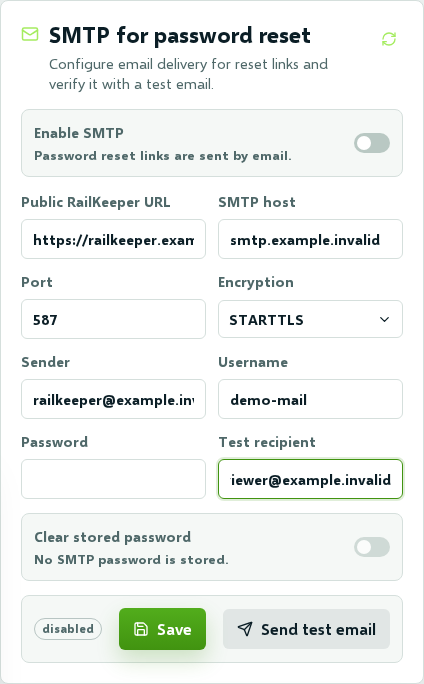
| Field | Enter |
|---|---|
| Public RailKeeper URL | The complete URL users use to reach this installation |
| SMTP host and port | Your provider's settings, not a command-station address |
| Encryption | The provider's required mode, such as STARTTLS or implicit TLS |
| Sender | An address permitted by the mail service |
| Username and password | Your own SMTP credentials or designated app password |
| Test recipient | A mailbox you control for the subsequent test |
The pictured values are not a working configuration. A localhost reset link refers to the recipient's own computer. Network access needs consistent URL, HTTPS, proxy and secure-cookie settings.
2. Save and deliberately test
Enable Enable SMTP, review details and select Save. Then deliberately choose Send test email. This action sends a real message to the specified recipient. Check the inbox and spam folder.
An empty password field preserves an already stored password. A separate clear-password switch explicitly removes it. Stored passwords are not returned as plain text.
3. Check password reset
- Verify that the intended local account has the correct email address.
- Open a separate sign-in session and Forgot password?.
- Request a link and check in your mailbox that it targets the intended installation.
- Open the current link, choose a personal new password and verify sign-in afterwards.
The request confirmation deliberately does not reveal whether an account exists. Only the newest open request remains valid; links expire after 30 minutes and are single-use. Password reset does not remove an active two-factor requirement.
4. Narrow down errors
| Observation | Check |
|---|---|
| Connection failed | SMTP host, port and reachability from the RailKeeper server |
| Authentication rejected | SMTP account, password and provider requirements |
| No mail received | Recipient, spam folder, provider logs and specific test result |
| Link targets another installation | Public URL, hostname and proxy configuration |
| Expired or already used link | Submit a new request and use only the latest link |
Form states were inspected in the local demo. Actual SMTP delivery and a real emailed password-reset link were not tested for this documentation. Sign-in help · Installation configuration.